How Do You Architect Reliable Rippling Integrations and Data Sync Systems?
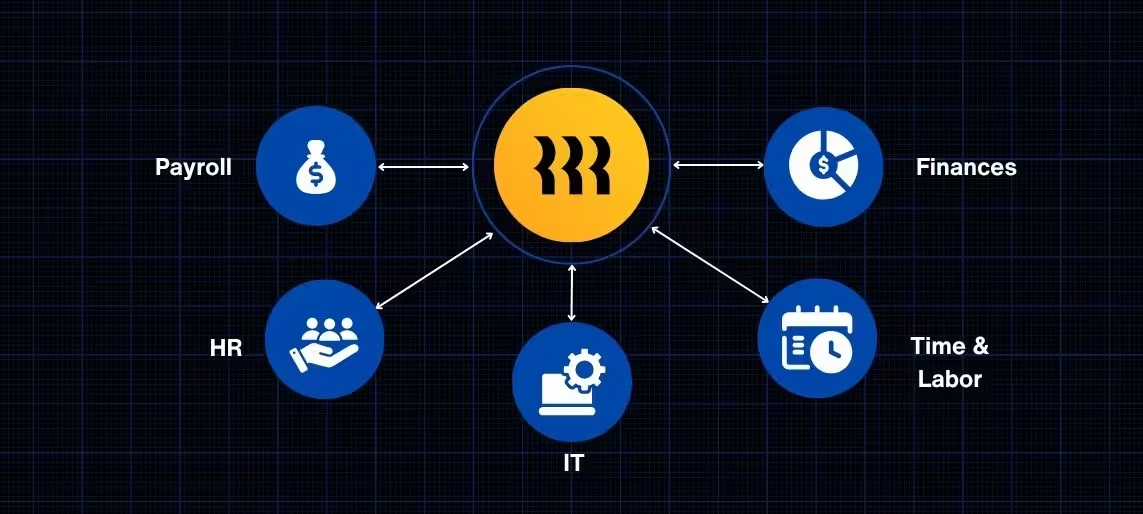
If you are evaluating Rippling or already using it, integrations are not just a feature. They are the foundation of how your systems actually work together.
Rippling integrations connect your HR, payroll, IT, and finance tools into one operating system. When they are set up correctly, data flows cleanly across platforms, payroll runs accurately, and your team is not stuck reconciling mismatched records.
When they are not, small issues turn into payroll errors, reporting gaps, and constant manual cleanup.
This guide breaks down how to approach Rippling integrations so you can build a system that actually holds up as your company grows.
What Are Rippling Integrations
Rippling integrations are the connections between Rippling and the rest of your business systems.
That includes:
- Accounting platforms like QuickBooks and NetSuite
- HR and payroll tools
- Time tracking systems
- IT provisioning and identity management tools
- Benefits, compliance, and third-party services
Rippling acts as the central source of truth for employee data. When someone is hired, promoted, or leaves the company, that information flows into every connected system.
The goal is simple. One system updates everything.
But that only works if the integration is designed correctly.
Why Most Rippling Integrations Fail
Most integration failures are not caused by Rippling itself. They come from how the integration is configured.
The most common issues include:
Poor ID Mapping
When systems identify employees differently, data breaks. One system uses email. Another uses name. Rippling uses internal IDs. Without alignment, records duplicate or fail to sync.
For a deeper explanation, see the article on why Rippling integrations break due to ID mapping mistakes.
One-Way Data Flow
If data only moves in one direction, discrepancies build quickly. Updates made in one system never reflect in another.
Learn more about how two-way integration works and why it matters for Rippling.
Broken Payroll Syncs
Payroll depends on clean data from time tracking, HR, and benefits systems. If one connection fails, payroll accuracy is compromised.
You can read more about how to prevent payroll sync failures in Rippling.
Misaligned Time and Labor Data
Time tracking feeds payroll and job costing. If that data is inconsistent, reporting becomes unreliable.
See how to properly design multi-system time syncs.
Multi-Entity Complexity
When multiple legal entities are involved, everything becomes more complex. Payroll, compliance, and reporting must stay separated but still connected.
Learn how to handle multi-entity architecture in Rippling.
The Core Components of a Reliable Integration Architecture
Reliable Rippling integrations are not built by simply connecting apps. They are built by designing how data moves between systems.
Stable Data Mapping
Every system needs to agree on how employees are identified.
The best practice is to use Rippling’s internal employee ID as the primary identifier and avoid using fields that can change, such as email or name.
For more detail, refer to the article on ID mapping mistakes in Rippling integrations.
Two-Way Data Flow
Your systems need to communicate, not just send information downstream.
With two-way integration, updates made in Rippling push to other systems, and updates made in external systems sync back into Rippling.
Without this, your data slowly drifts out of sync over time.
For more detail, see the guide to Rippling two-way integration.
Clean Payroll Connections
Payroll is where integration issues become visible.
To keep payroll accurate:
- Time data must flow cleanly into payroll
- Employee changes must sync immediately
- Payroll journals must map correctly to your accounting system
If this setup is not handled properly, errors compound quickly.
You can learn more about avoiding payroll sync failures in Rippling.
Structured Time and Labor Data
Time tracking is not just about hours worked. It feeds payroll and financial reporting.
A strong setup ensures:
- Time data maps to the correct cost centers
- PTO and non-billable time are accounted for
- Labor costs flow into accounting systems correctly
For more detail, review how to design multi-system time syncs.
Multi-System and Multi-Entity Alignment
If your business operates across multiple entities, your integrations must reflect that structure.
This includes:
- Entity-specific payroll setups
- Segmented reporting
- Controlled data flow between systems
For more detail, see how to structure multi-entity setups in Rippling.
How Rippling Integrations Power Job Costing and Financial Reporting
When Rippling integrations are set up correctly, they do more than automate HR tasks. They power financial visibility across your organization.
For project-based businesses, this is especially important.
With the right setup:
- Employee time flows into payroll
- Payroll flows into your general ledger
- Labor costs are tied to projects or cost centers
This is what enables accurate job costing.
For more detail, see how job costing works with Rippling integrations.
How to Know If Your Rippling Integration Is Set Up Correctly
A reliable integration setup should feel invisible.
Here are signs your system is working as expected:
- Employee updates sync across all systems automatically
- Payroll runs without manual adjustments
- No duplicate employee records
- Reports match across systems
- New hires and terminations trigger correctly everywhere
If any of these are not true, there is likely a structural issue in your integration setup.
When to Bring in an Integration Partner
Rippling is a powerful platform, but it is not plug-and-play at scale.
You should consider working with an implementation partner if:
- Your integrations keep breaking
- Payroll issues are recurring
- You are managing multiple entities
- You are connecting Rippling to an ERP like NetSuite or QuickBooks
- You want to automate job costing or reporting
At PARA Consulting, we focus on designing integration architecture that supports long-term growth, not just initial setup.
Conclusion
Rippling integrations are not just about connecting systems. They are about building a structure that keeps your business running accurately as it scales.
When your integrations are designed correctly, your systems stay aligned, your data stays clean, and your team can focus on work that actually moves the business forward.
If they are not, small issues compound into larger operational problems over time.
Taking the time to architect your integrations correctly is what makes the difference.