What NetSuite Modules Do You Need for Your Business?
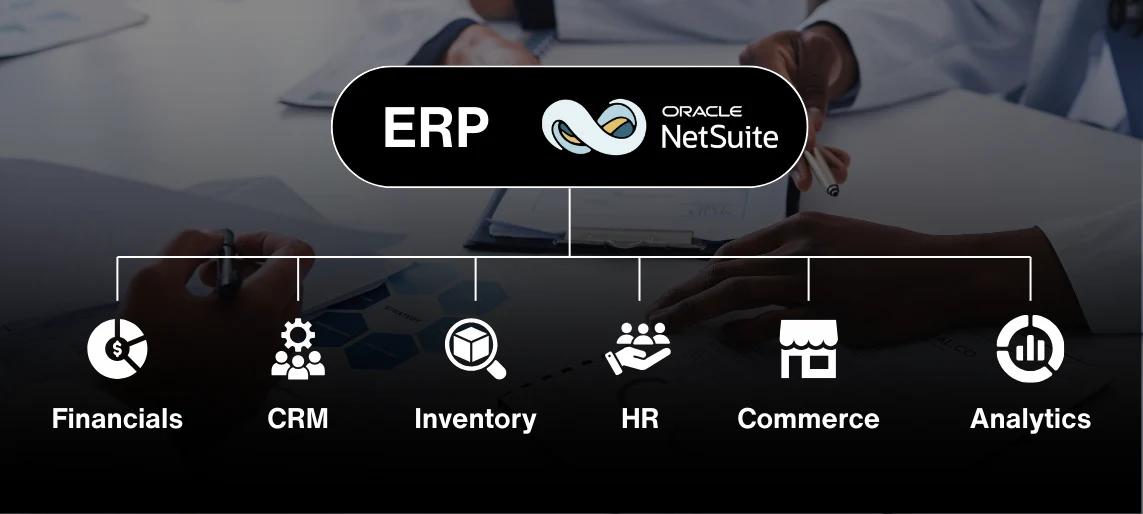
You're evaluating NetSuite or already using it, and now you're stuck figuring out which modules you actually need versus which ones are just nice to have. NetSuite has dozens of modules spanning financials, CRM, inventory, e-commerce, HR, and more. Some are core to the platform. Others are add-ons that cost extra. This guide breaks down what each major NetSuite module does, which problems it solves, and how to decide which ones make sense for your business without overpaying for features you won't use. You'll learn the difference between NetSuite modules and SuiteApps, when to add modules as you grow, and how to evaluate what you need based on your industry and operational complexity. If you're building out your NetSuite setup and trying to avoid both underbuying and overbuying, this is your roadmap.
What are NetSuite modules?
NetSuite modules are functional components of the ERP system that handle specific business processes.
Think of NetSuite as a platform. Modules are the pieces you add based on what your business needs to do.
Some modules are part of the core NetSuite ERP (like basic financials and GL). Others are optional add-ons that you purchase separately based on your requirements.
The modular approach means you can start with the essentials and add functionality as your business grows or your needs change.
What are the core NetSuite ERP modules?
These modules come with the base NetSuite ERP platform:
Financial Management:
- General ledger
- Accounts payable and receivable
- Cash management
- Financial reporting
- Multi-currency support
- Multi-entity consolidation
Order Management:
- Sales orders
- Purchase orders
- Fulfillment
- Returns and refunds
Inventory Management:
- Item tracking
- Stock management
- Basic warehouse functionality
CRM (Basic):
- Contact and account management
- Opportunity tracking
- Basic sales automation
These core modules handle the fundamentals: tracking money, managing orders, and keeping tabs on inventory and customers.
For many businesses, the core modules are enough to get started. Where things get interesting is when you need more advanced capabilities.
What are the advanced NetSuite modules?
Advanced modules extend NetSuite's capabilities for specific business needs:
Financial modules
Advanced Financials:
- Advanced revenue recognition (ASC 606 compliance)
- Amortization schedules
- Allocation and distribution
- Advanced intercompany accounting
SuiteBilling:
- Subscription billing
- Usage-based billing
- Recurring revenue management
- Automated invoicing for complex billing scenarios
Planning and Budgeting:
- Financial planning
- Budget vs. actual reporting
- Scenario modeling
- Driver-based planning
When you need these: If you're managing subscriptions, complex revenue recognition, or multi-entity financials, these modules solve problems the core financials can't handle.
Inventory and supply chain modules
Advanced Inventory Management:
- Multi-location inventory
- Lot and serial number tracking
- Bin management
- Cycle counting
Demand Planning:
- Forecast modeling
- Demand sensing
- Inventory optimization
WMS (Warehouse Management System):
- Mobile RF barcode scanning
- Directed picking and putaway
- Wave and zone picking
- Warehouse layout management
When you need these: If you're managing physical products across multiple warehouses or need tight inventory control with lot/serial tracking, these modules become essential.
CRM and customer management modules
NetSuite CRM:
- Advanced sales automation
- Partner relationship management
- Marketing automation
- Customer service and support
Contract Renewals:
- Subscription renewal management
- Contract lifecycle tracking
- Automated renewal workflows
When you need these: If your sales process is complex, you manage partners or channels, or you have subscription-based revenue, the advanced CRM modules give you capabilities basic CRM can't.
E-commerce and retail modules
SuiteCommerce:
- B2B and B2C e-commerce
- Unified commerce (online and in-store)
- Customer self-service portal
- Mobile-optimized shopping
Point of Sale:
- Retail POS
- Mobile POS
- Inventory sync with e-commerce
- Customer loyalty programs
When you need these: If you're selling online or operating retail locations, SuiteCommerce connects your sales channels to your ERP so inventory, orders, and customer data stay in sync.
HR and workforce modules
SuitePeople:
- Employee records and self-service
- Time and attendance tracking
- Expense management
- Payroll (with partners)
SuitePeople Workforce Management:
- Scheduling
- Time tracking
- Labor cost management
When you need these: If you're managing a workforce and need HR functionality integrated with your ERP, SuitePeople eliminates the need for a separate HR system.
Analytics and reporting modules
NetSuite Analytics Warehouse:
- Data warehouse for aggregating data from multiple sources
- Advanced analytics and BI
- Custom dashboards and visualizations
SuiteAnalytics:
- Real-time reporting
- Customizable dashboards
- Ad-hoc queries
When you need these: If your reporting needs go beyond standard NetSuite reports or you need to combine NetSuite data with external sources, these modules give you the analytics horsepower.
What are SuiteApps and how are they different from modules?
SuiteApps are third-party applications built on NetSuite's SuiteCloud platform.
NetSuite modules are built by NetSuite and integrated directly into the platform. They're part of the core product.
SuiteApps are developed by third parties (or NetSuite partners) and extend NetSuite's capabilities for specific industries or use cases.
Examples of SuiteApps:
- Industry-specific solutions (construction, healthcare, nonprofits)
- Advanced tax compliance tools
- Specialized CRM features
- Integration connectors for other platforms
How to think about it
Modules are like features built into your car. SuiteApps are like aftermarket add-ons that give you specific functionality the base car doesn't have.
You install SuiteApps from the SuiteApp marketplace. They require separate licensing and implementation.
How do you decide which NetSuite modules you need?
Start with the problems you're trying to solve, not the features list.
Start with core ERP if:
- You need basic financials, order management, and inventory
- Your business is relatively straightforward
- You're replacing QuickBooks or another basic accounting system
Add Advanced Financials if:
- You have subscription revenue or complex billing
- You need ASC 606 revenue recognition
- You manage multiple entities with intercompany transactions
Add Advanced Inventory if:
- You manage inventory across multiple warehouses
- You need lot/serial number tracking for compliance
- Demand planning and forecasting are critical
Add CRM modules if:
- Your sales process is complex with long cycles
- You manage partners or reseller channels
- Marketing automation and lead nurturing are important
Add SuiteCommerce if:
- You're selling online (B2B or B2C)
- You operate retail stores and need unified commerce
- Customer self-service is important
Add SuitePeople if:
- You need HR functionality integrated with your ERP
- Time tracking and expense management are pain points
- You're managing a distributed workforce
Add Analytics Warehouse if:
- Standard reports don't give you the insights you need
- You need to combine NetSuite data with external sources
- Advanced BI and data warehousing are requirements
What's the cost of adding modules in NetSuite?
NetSuite modules add to your annual licensing cost.
Core NetSuite ERP: $10,000-$30,000+ annually depending on users
Advanced modules: Each module typically adds $5,000-$25,000+ annually depending on complexity and user count
Implementation: Adding modules requires configuration and potentially customization, which adds to implementation costs
The key is balancing functionality you need now versus what you can add later. Starting lean and adding modules as you grow is often smarter than buying everything upfront.
NetSuite modules comparison
You Might Be Wondering
Can you add modules after initial implementation?
Yes. NetSuite's modular design lets you add functionality as your needs grow. You'll need to configure and test new modules, but it doesn't require reimplementing the entire system.
Do all modules integrate seamlessly?
Yes, when they're NetSuite modules. SuiteApps (third-party apps) usually integrate well but may require additional configuration.
How do you know if a module is worth the cost?
Calculate the cost of the module against the value it delivers. If Advanced Financials saves your team 20 hours a month on revenue recognition and improves compliance, the ROI is clear.
Can you customize NetSuite modules?
Yes. NetSuite provides tools like SuiteScript and SuiteFlow for customization. You can tailor workflows, forms, and reports without affecting future updates.
Ready to figure out which NetSuite modules fit your business?
NetSuite's modular approach gives you flexibility to start with what you need and add capabilities as you grow.
The key is understanding which modules solve real problems versus which ones are nice to have but not essential.
We work with businesses to evaluate which NetSuite modules make sense based on your operations, industry, and growth plans. Whether you're implementing NetSuite for the first time or optimizing an existing setup, we help you build the right configuration without overpaying.
Book a free consultation with PARA to talk through your NetSuite needs and figure out which modules fit your business.
Sources
NetSuite. (n.d.). NetSuite modules and editions. Retrieved from https://www.netsuite.com/portal/products/erp/modules.shtml
NetSuite. (n.d.). SuiteApp marketplace. Retrieved from https://suiteapp.com/