
Why Do Most Companies Fail to Use Rippling Workflow Automation Effectively?

What Most Companies Get Wrong About Rippling
Most companies implement Rippling to solve a specific problem.
They want to run payroll.
They want to manage employee data.
They want to streamline onboarding.
So they set it up, build a few workflows, and move on.
But that is where they stop.
Rippling is not just a system of record. It is a system that can control how work actually moves through your business.
When it is only used for storage and basic automation, teams still rely on:
- Manual follow-ups
- Slack messages to chase approvals
- Last-minute payroll fixes
- Reactive problem solving
That is not automation. That is assisted manual work.
What Is Rippling Workflow Automation?
Rippling workflow automation is the ability to trigger actions across your organization based on changes in employee data.
Because everything in Rippling is tied to the employee profile, updates in one area can automatically affect payroll, benefits, access, and reporting.
Examples include:
- A new hire triggers IT provisioning and payroll setup
- A compensation change updates payroll automatically
- A location change updates tax requirements
This connected system is what allows Rippling to move beyond simple task automation.
What an Operational Control System Means
An operational control system ensures that:
- The right actions happen at the right time
- The right people are responsible
- Issues are surfaced and resolved automatically
- Work does not depend on memory or manual follow-up
In Rippling, this is achieved through workflow automation combined with structured notifications and ownership.
How Rippling Workflow Automation Actually Works
At a system level, Rippling operates as a chain of events:
- Employee data changes
- A workflow trigger is activated
- Conditions determine what should happen
- Notifications are sent to the right people
- Actions are taken
- Escalation occurs if nothing happens
How Rippling Functions as an Operational Control System
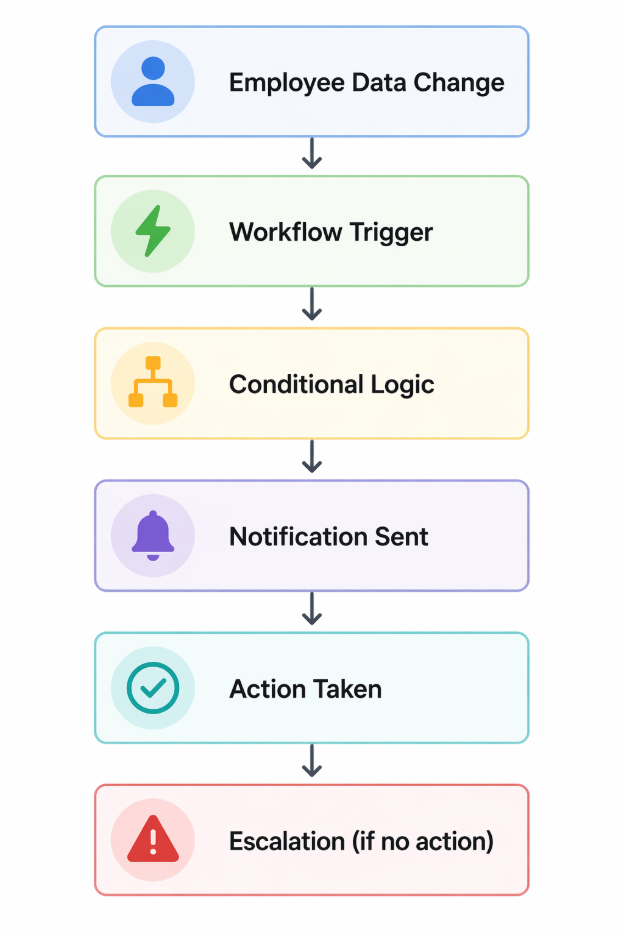
This is the difference between having data and controlling outcomes.
Why Rippling Workflow Automation Is Different
Most systems automate within a single function.
Rippling connects automation across:
- HR
- Payroll
- Benefits
- IT
- Recruiting
This works because all data is unified under the employee profile.
That means one change can trigger multiple downstream actions without manual coordination.
The Gap Between Automation and Control
Most companies never reach full control.
Instead, they experience:
- Alerts that sit in the system
- Workflows that only partially solve problems
- Teams that are unsure who owns what
For example, Rippling will flag missing bank information or unapproved timecards.
But unless those alerts trigger action, someone still has to find and fix the issue manually.
This is why many teams struggle with Rippling notifications becoming noisy instead of useful, instead of acting as a structured system for driving action.
The Three Layers of Operational Control in Rippling
To turn Rippling into an operational control system, you need more than basic automation. You need a structured system.
Layer 1: Visibility
The system surfaces issues:
- Missing data
- Approval gaps
- Compliance risks
This is where most implementations stop.
Layer 2: Workflow Automation
Workflows trigger actions:
- Notify the right team
- Assign responsibility
- Route approvals
This is where automation begins to create value.
See real examples in advanced Rippling workflow automation.
Layer 3: Notifications and Escalation
Notifications ensure that workflows actually lead to outcomes.
At this level:
- Alerts are routed to the correct owner
- Work is assigned immediately
- Escalation happens if no action is taken
This is where Rippling moves from automation to control.
The Role of Rippling Notifications in Operational Control
Workflow automation defines what should happen.
Rippling notifications ensure that it actually does.
Without a structured notification system:
- Alerts remain inside the platform
- Teams are not aware of issues in real time
- Responsibility is unclear
- Work gets delayed or missed
Rippling will surface issues such as missing payroll data or unapproved timecards.
But surfacing an issue is not the same as resolving it.
To function as an operational control system, notifications must:
- Be routed to the correct owner
- Be tied directly to workflows
- Trigger action, not just awareness
- Escalate when no action is taken
For a deeper breakdown, see how to reduce alert fatigue with Rippling notifications.
How Notifications Fit Into Workflow Automation
Notifications are not a secondary feature in Rippling. They are a core part of how workflow automation functions.
If workflows define what should happen, notifications ensure that it actually does.
Without structure:
- Alerts sit in the system
- Ownership is unclear
- Teams ignore notifications
With structure:
- Alerts trigger workflows
- Work is assigned immediately
- Escalation happens automatically
In many cases, alert fatigue is not caused by too many notifications, but by poorly structured ones.
What High-Performing Rippling Setups Do Differently
High-performing environments:
- Define ownership for every workflow
- Use conditions to reduce noise
- Align workflows across departments
- Treat Rippling as a system, not a tool
Lower-performing environments:
- Build isolated workflows
- Over-notify teams
- Rely on manual follow-up
- Lack accountability
The system is the same. The design is not.
Common Mistakes With Rippling Workflow Automation
Building workflows before defining structure
Without clear departments, roles, and ownership, workflows break down quickly.
Automating broken processes
Automation scales whatever exists. If the process is flawed, automation will amplify the problem.
Ignoring cross-system impact
Employee data affects payroll, benefits, and reporting. Workflows must account for these dependencies.
Treating notifications as optional
If notifications are not tied to workflows, they become passive and ineffective.
Why Clean Setup Determines Success
One of the biggest factors in successful automation is how Rippling is set up from the beginning.
If setup is rushed:
- Data becomes inconsistent
- Workflows fail
- Payroll discrepancies increase
If setup is done correctly:
- Automation works reliably
- Reporting is accurate
- Teams trust the system
This is why implementation quality directly impacts long-term results.
Where PARA Comes In
Most teams do not need more features. They need structure.
PARA helps organizations:
- Design workflow automation aligned to operations
- Define ownership across teams
- Build notification systems that drive action
- Connect Rippling with the rest of their stack
The goal is not just to implement Rippling.
The goal is to make it run your business.
Final Thought: From Tool to System
Rippling can function in two very different ways.
It can be a place where data lives and tasks are tracked.
Or it can be a system that ensures work happens correctly, consistently, and automatically.
The difference comes down to how workflow automation and notifications are designed together.
When done right:
- Problems are surfaced early
- Work is routed automatically
- Accountability is built into the system
That is what it means to use Rippling as an operational control system.
Build Rippling Workflow Automation That Actually Runs Your Business
Most companies stop at basic setup.
Real value comes from designing workflows, ownership, and notification systems that reflect how your business actually operates.
PARA helps teams turn Rippling into a connected operational system where workflow automation and notifications work together to drive action, reduce manual work, and keep everything moving without constant oversight.