Is HubSpot an ERP or CRM?
You're evaluating business software and trying to figure out where HubSpot fits. Here's the straightforward answer: HubSpot is a CRM, not an ERP. It manages customer relationships, sales processes, and marketing automation. It doesn't handle accounting, inventory, procurement, or supply chain management. This guide breaks down what HubSpot does as a CRM, what ERP features it lacks, why the distinction matters for your tech stack, and how HubSpot integrates with ERP systems like NetSuite or SAP when you need both. If you're building out your business systems and trying to figure out where HubSpot fits (or whether you need an ERP on top of it), this clears up the confusion.
Is HubSpot an ERP or a CRM?
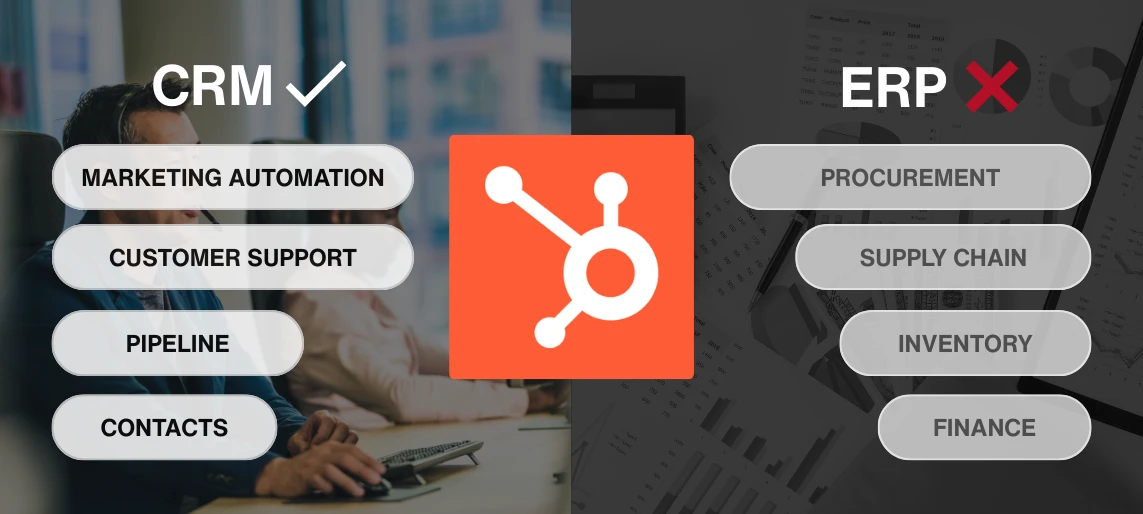
HubSpot is a CRM (Customer Relationship Management) platform, not an ERP (Enterprise Resource Planning) system.
This distinction matters because the two types of software solve completely different problems.
A CRM helps you manage customer relationships, track sales processes, automate marketing, and support customers. It's focused on the front office: how you acquire, engage, and retain customers.
An ERP manages your core business operations: accounting, inventory, procurement, supply chain, manufacturing, and financial consolidation. It's focused on the back office: how you run the business operationally and financially.
HubSpot does the first part. It doesn't do the second.
What does HubSpot do?
HubSpot's CRM helps you manage the entire customer lifecycle:
Sales:
- Contact and company management
- Deal tracking and pipeline management
- Email tracking and templates
- Meeting scheduling
- Sales automation and workflows
- Quote and proposal generation
Marketing:
- Email marketing campaigns
- Landing pages and forms
- Social media management
- Blog and content management
- Marketing automation
- Lead scoring and nurturing
Customer Service:
- Ticketing system
- Knowledge base
- Live chat and chatbots
- Customer feedback surveys
- Service automation
Reporting:
- Sales dashboards and forecasting
- Marketing attribution and campaign analytics
- Customer service performance metrics
- Custom reporting across all functions
HubSpot excels at helping your team track customer interactions, automate repetitive tasks, and get visibility into what's working across sales, marketing, and service.
What ERP features does HubSpot not have?
HubSpot doesn't handle the operational and financial functions that ERP systems manage:
Finance and Accounting:
- General ledger
- Accounts payable and receivable
- Financial consolidation across entities
- Revenue recognition
- Budgeting and financial planning
Inventory and Supply Chain:
- Inventory management
- Warehouse management
- Purchase order processing
- Supplier management
- Demand planning
Manufacturing and Production:
- Production planning
- Bill of materials (BOM)
- Work orders
- Quality control
- Shop floor management
Procurement:
- Procurement workflows
- Vendor management
- Contract management
- Spend analytics
If your business needs to manage these functions, you need an ERP like NetSuite, SAP, Oracle, or Odoo. HubSpot won't solve these problems.
What problems does each system solve?
Can you integrate HubSpot with your ERP system?
HubSpot doesn't replace an ERP, but it integrates with ERP systems to connect customer data with operational and financial data.
Common ERP integrations:
HubSpot + NetSuite:
- Sync customers, orders, and invoices
- Update deal values based on actual revenue
- Track customer payment status in HubSpot
- Automate order creation from closed deals
HubSpot + SAP:
- Sync customer and account data
- Track order fulfillment status
- Connect sales pipeline to financial forecasts
HubSpot + Odoo:
- Sync contacts and sales orders
- Automate invoice generation from deals
- Track inventory availability for sales
HubSpot + QuickBooks:
- Sync invoices and payment status
- Track revenue by customer
- Automate billing from closed deals
What integration gives you
When HubSpot and your ERP are integrated, your sales team sees customer payment status, order fulfillment, and invoice details without leaving the CRM. Your finance team sees which deals are in pipeline without logging into HubSpot.
You get a unified view of the customer across front office and back office systems.
Who should use HubSpot as their CRM?
HubSpot's CRM works well for businesses that need to:
- Manage customer relationships and sales processes
- Automate marketing campaigns and lead nurturing
- Provide customer support with ticketing and knowledge base
- Track the customer journey from first touch to renewal
- Get visibility into sales, marketing, and service performance
HubSpot is particularly valuable for:
- Small to mid-sized businesses (10-500 employees)
- Companies scaling their sales and marketing operations
- Businesses that need user-friendly tools without heavy IT involvement
- Teams that want flexibility and integrations without ERP-level complexity
When you also need an ERP:
If your business handles physical products, manages complex financials across entities, or needs procurement and supply chain management, you'll need an ERP alongside HubSpot.
The two systems complement each other. HubSpot manages the customer relationship. Your ERP manages the operational execution.
Ready to figure out where HubSpot fits in your tech stack?
HubSpot is a CRM. It manages customer relationships, sales processes, and marketing automation. It doesn't replace an ERP, but it integrates with ERP systems when you need both.
If you're evaluating whether HubSpot is the right CRM for your business or figuring out how to integrate it with your existing ERP, we help businesses design systems architecture that support growth without friction.
Book a free consultation with PARA to talk through your CRM and ERP needs and figure out the right setup for your business.
Sources:
HubSpot. (n.d.). HubSpot CRM. Retrieved from https://www.hubspot.com/products/crm
HubSpot. (n.d.). HubSpot integrations. Retrieved from https://www.hubspot.com/integrations
Frequently Asked Questions
Frequently Asked Questions
Other Relevant Topics